
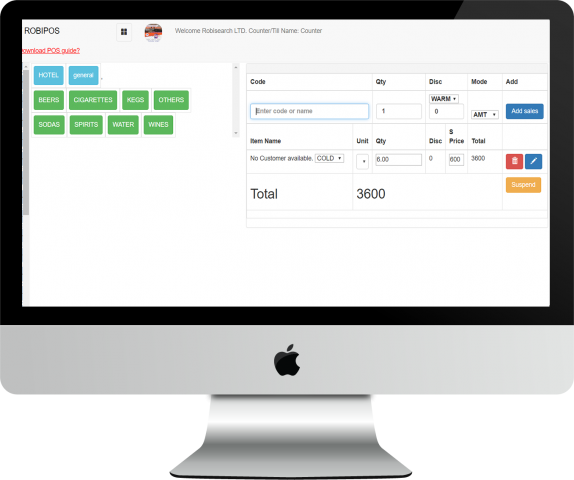
For a business owner you probably know what a POS is, for a random person, a POS (point of sale) is a system that allows you to keep track of your stock and sales and generally help you manage your business digitally. This is the most efficient way to go because let’s say if you have employed people and yourself your work is just to get reports from managers, trust issues won’t be a problem anymore. You will be able to automatically get reports, tracks sales just at the comfort of wherever you prefer.
Robisearch Ltd has the best reknown POS system countrywide. We have clients from all over the country and several partners as well. Our main aim with the POS is to promote technology in the business sector.
The POS is suitable for businesses like restaurants and eateries like nyama choma zones, chemists, bars, wines and spirits shops, grocery stores, hardware stores, agrovet stores, electronic shops and so much more.
The POS basically is a system for a business owner who has a bunch of stock and would like to clearly keep a record of all of them. A lot of stock may be overwhelming and having a smooth software to help you run them is definitely the solution.
Robisearch ltd’s Point of sale system has the following important features to help in smooth running of a business.
- Reduced errors during sales
- More than one branch support
- Clients can pay in different currencies
- Serial number generation
- Automated human resource management module
- Accounting modules
- Faster return on investments
- Discounts and payment in instalments support.
- Ability to view returned goods
- Bulk sms module ( allows you to communicate with your clients)
Among other several modules within the system are;
Retails sales – This is the selling window. Where the cashier is able to generate a receipt for the goods sold.
Wholesale sales – This is also the same as retail sales but now huge quantities of items or products.
Cashier sales- This module is used to view the sales made by the cashier. You will know which cashier has sold what and at what time.
Record delivery- This module is used mainly by people who do delivery of their products. in this module they’ll be able to see the records of the deliveries they have done.
Income module – Used mainly by people who sell on credit, to view balances on the items they sold.
Purchases- This helps in keeping records of the items the business gets from suppliers.
Expenses- This helps in knowing the expenses the business has incurred. eg payment of staff, maintenance etc
Return/reprint sales- This helps in viewing the returned goods by the customer.
Category of products- Helps in sorting products by creating and viewing categories and subcategories of products.
Stocklist (counter)- This module helps in adding, viewing, downloading, opening and closing stock.
Products (mainstore)- This helps in adding new products to the store and viewing as well.
Dispatched stocklist- This module is used to view the products transferred from the main store to the counter.
Issued stocklist- This module helps in viewing products transferred from the main store to personal use by the staff or employees.
Low stocklist- This module alerts on the products on the counter that have reached their re order level
Low store- Alerts on the products that have reached their re order level in the main store.
People/contacts- This module is used to add people in the system.
Users- Used to add and view employees in the business using the system.
Grouping members- This module is used to add and view categories of people and the members assigned to these categories.
Call center- This is where all the calls received by the business is recorded.
Projects management- This module helps in following up and handling of a project eg in budgeting or the total items needed for that project.
Loyalty cards- This helps in redeeming of customer’s points.
Send sms- Helps in sending bulk sms to your customers after grouping.
Mpesa Intergration – Allows you to receive pop up mpesa messages from the system whenever a customer pays.
Documents- This module helps in viewing, saving and uploading documents for the business eg licences.
Tasks – This helps in allocating tasks to employees eg who is in charge of a certain shelf/product.
Deals- Helps in recording all the deals the business have made and with which customers.
Comments/complaints- This is especially for employees for airing in their views or complaints about the business.
Events- This is where all the events for the business are recorded eg retreats for the staff.
Accounting- Helps in adding accounts, creating general ledger accounts and even the payment methods.
Bank deposits- This module helps in recording all the payments received by the business and is recorded in various bank accounts.
Bank transfers- This helps in viewing how the money have been flowing in and out of the business.
Journal Entry- This is for viewing entries
Accounting reports – This module shows the balance sheets, cash flows and how money has been going in and out of a particular account.
Damaged products- This is where all the damaged products are recorded.
Payroll set up- This module is used to allocate employee payments and deductions.
Manage reports – Detailed report: shows details of the product sold eg name, quantity etc
Summary report: shows the modes of payment fora particular sale.
Display sales report- Enables you to view all sales per counter within the stated dates.
Branch- This module is used to add other branches of the business.
Change password-This is where the password of the system can be changed.
To get this system with the modules of your choice contact Robisearch ltd at 0716413 3860 or 07806 55987
Or visit www.robisearch.com